Categories
Requirements

Make large public works projects run smoothly

Make large public works projects run smoothly

Rail Projects Victoria uses IBM requirements management SaaS solution in their massive Metro Tunnel Project

By Thomas Hollowell | 3 minute read | September 11, 2019

Imran Hashmi IBM ELM engineering lifecycle management

IBM’s requirements management solutions have been used for years to help organizations build software and hardware systems. And now, an IBM software as a service (SaaS) solution helps government and engineering/constructions projects to run smoothly. One particularly high-profile application of this solution is the Melbourne Metro Tunnel Project.

The largest investment ever in public transport in Melbourne, Australia

Rail Projects Victoria (RPV) uses IBM’s technology to simplify the management of the delivery of the Metro Tunnel Project. This AUD 11 billion (11 billion Australian dollars) initiative creates a new underground pathway for trains to accommodate over 500,000 new passengers during peak hours each week. Construction involves the cooperation and collaboration of many different public and private organizations.

IBM’s DOORS® Next requirements management SaaS solution was implemented by the RPV team to provide a single, collaborative, secure environment to capture, trace, analyze and manage project requirements in real-time. And as it does so, it preserves the data privacy and intellectual property of the various organizations delivering the project.

Collaborators no longer need to gather updates from different companies’ systems. Instead, they use the IBM solution to obtain a single, reliable source of information. It’s securely controlled and selectively shared with each organization as needed. This improves project predictability, minimizes rework and increases communication.

IBM business partners in Australia—including Acmena—are supporting this project. Acmena, is supporting this project, and is using this solution as a platform to share requirements on large public works projects in New Zealand and Australia. Recently several large engineering/construction firms in the US and Canada have also turned to IBM’s requirements management SaaS solution for managing large public construction projects. One firm is a consortium developing rail and light rail transit infrastructure in Canada. Another client is one of the top five largest contractors in North America.

Read how Rail Project Victoria is staying on track with IBM

Three reasons construction firms choose IBM SaaS requirements management

  1. Increasing competition and greater project complexity are driving architectural, engineering and construction (AEC) firms and public entities to seek ways to reduce costs and improve project performance. For AEC firms, requirements are the basis for project planning, risk management and acceptance testing. They define what the stakeholders need and what the product must meet in order to satisfy those needs.
  2. The project development process often lacks identification, management and traceability of the requirements. IBM’s requirements management solution, DOORS Next, helps solve these gaps.
  3. Requirements management tools are not as prevalent in the construction industry as they are in the system and software world. The large number of diverse stakeholders in these large construction projects significantly increases complexity and makes coordination of effort difficult – hence the need for a requirements management solution to keep everyone on the same page.

Why software as a service?

Typically, an organization chooses a SaaS solution for a variety of reasons. These include the desire to lower overall cost, increase efficiency, improve productivity or enable flexibility. However, large engineering and construction projects are unique in that they often involve dozens of different organizations. A cloud-based solution allows these companies to collaborate without compromising corporate firewalls. Organizations can scale up and down depending on their involvement in various stages of the project. They don’t need to make a capital investment in hardware and software.

Learn more about how the IBM DOORS Next requirements management solution can help you keep your large construction projects on track.

Read these articles about the Rail Projects Victoria (RPV) project:

Rail Projects Victoria: Requirements Management

IBM keeping the AU$11 billion metro tunnel on track

Vic Metro Tunnel Project employs IBM tech

IBM and Rail Projects Victoria keeping the $11B Metro Tunnel on track
Categories
Requirements

Systems Engineering for the Internet of Things

Systems Engineering for the Internet of Things

Today’s connected world is increasing product complexity, putting systems engineers at the heart of a new challenge to deliver products faster and with improved quality. IBM Engineering offers a variety of cloud-based tools to help teams better collaborate, improve requirements, manage workflow and testing. Learn more about systems engineering lifecycle solutions from IBM Watson IoT: https://ibm.co/ibmelm #systemsengineering #IBM #WatsonIoT

Categories
Requirements

What’s new in IBM Engineering Lifecycle Management 7.0.2

by Daniel Moul 

Good engineering practices, tools and people give organizations a competitive edge, enabling teams to be more productive with fewer errors while developing increasingly complex products and systems. Our focus for 7.0.2 has been increasing the productivity of practitioners using the IBM Engineering Lifecycle Management solution. Below are some of the high points.

Making use of traceability for change impact analysis and reporting

  • Simplified linking: drag-drop or copy-paste links within and between requirements, tests, and work items
  • Simplified linking: more intuitive work item linking and navigation in the context of global configurations; by mapping relationships from the Global Config to a release defined in Engineering Workflow Management (EWM), and asserting release-to-release relationships in EWM, practitioners now see all relevant work items in a particular GC context, navigation from a work item to a versioned requirement, test or model element, and practitioners can report on these relationships using Report Builder and Engineering Insights.
  • Report on models managed by Rhapsody Model Manager (RMM) and traceability with other artifacts in the engineering lifecycle (beta).
  • Report on files managed by the Jazz SCM (part of EWM) and traceability with other artifacts in the engineering lifecycle (beta).

New efficiencies for teams adopting IBM Engineering to improve Automotive SPICE maturity and functional safety (ISO 26262)

  • New ISO 26262 content in IBM Automotive Compliance.
  • New token license enforcement, simplifying license compliance.

Awareness of change for requirements engineers

  • A new requirements comparison report is available for practitioners in the configuration compare/deliver workflows. The Reportable REST API was enhanced to include change information, and a PUB template provided, which you can use to create your own reports that make use of change information.
  • Module audit history is visible in the web.

New efficiencies for V&V test teams

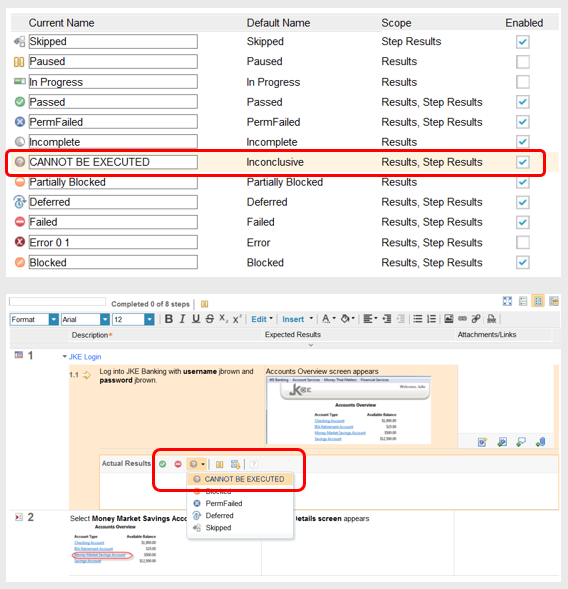
  • Make use of custom execution states in test step results, new options to include more information when duplicating execution records, and improved offline text execution, including use of execution variables.
  • Try out the technical preview of ETM multi-component support, which provides easier test reuse (a test plan can include test assets from multiple components) and also simplifies creating affinity between requirements and tests in similarly-scoped components.
  • We tested Engineering Test Management with 20M artifacts and 2500 global configuration contributions managed by one ETM server. Details will be in the usual place on the Deployment wiki.

New efficiencies for team members using work items to plan and track their work

  • Beyond the simplified linking mentioned above, large attachments can be stored in an external content registry, including a file system or WebDAV server like Artifactory.

New efficiencies for developers using the Jazz SCM

  • Massive speed-up when updating the sandbox in Jazz and Jenkins builds using optimized incremental loads when there are no significant changes, now also possible when using load rules (we saw 96% speed-up in our development environment: from 27 minutes to less than one minute in one test; your mileage may vary).

New efficiencies for teams using EWM and Git

  • When using GitHub and a Chrome browser, it’s easier to link a commit or pull request with a work item using a new graphical picker.
  • A new Git diagnostic page makes integration issues visible and provides guidance for EWM administrators to resolve them.

New efficiencies in reporting and document generation

  • Report Builder terminology changes make it easier for practitioners to develop their own mental model about how reporting works.
  • It’s now easier to find the report you’re looking for in Report Builder using different report groupings.
  • Column headings do not scroll with the data, making it easier to relate columns of data and their meaning when working with tables that have many rows.
  • For Publishing Document Builder report administrators, creating connections are easier, and it’s easier to find connections when associating them with data sources.

New efficiencies when setting an owner or subscriber

  • In most places the people picker dialog box uses heuristics to anticipate the people you are likely to pick, reducing users’ overheads.

New efficiencies monitoring, starting and stopping applications

  • New REST APIs provide readiness and liveness probes, simplifying startup and heartbeat monitoring.
  • We did work to streamline application startup and shutdown. Additionally, if you are still using traditional WebSphere Application Server, you likely can get even faster startup and shutdown by moving to WebSphere Liberty, which we are now recommending for all deployments.

Complying with your corporate security & identity management policies

  • You can use application passwords for authenticating when using non-web clients; this provides a way to implement multi-factor authentication for these clients (it’s already available for web clients).
  • Delegate to your corporate third-party identity provider over OpenID Connect (OIDC) or SAML.
  • Distributed logout: when a user logs out of one ELM application, other ELM applications using the same browser session are notified and will log the user out.

Keeping things fresh: updates to the specified operating environment (a.k.a. system requirements)

  • Added RHEL 8.2 on all supported hardware platforms and SUSE 15 on x86-64
  • EWM workstation support includes Ubuntu LTS 20.04
  • Added Eclipse 4.16 (separate Eclipse p2 install), including optionally running Eclipse on OpenJDK 11
  • Updated GitHub, GitLab, and Gerrit versions

For more information on Engineering Lifecycle Management 7.0.2, see the more detailed “What’s New” posts and the various “New & Noteworthy” documents, for example, starting with Workflow Management. A Release Candidate 2 (RC) is available now, and the generally available (GA) version is coming soon.

Daniel Moul
Offering Management

Categories
Requirements

What’s new in IBM Engineering Test Management v7.0.2

by Christophe Telep

To improve the accuracy and efficiency of engineering processes, this IBM Engineering Test Management (ETM) new release offers additional ways to tailor the out-of-the-box test management process to some specific teams’ needs. For example, project administrators can now customize the execution states for test script results. The default names such as Passed or Failed can be modified and some execution states can be disabled altogether.Imran Hashmi IBM ELM engineering lifecycle management

Custom execution states for test step results

One of the key benefits of the IBM Engineering solution is to improve the efficiency of product line engineering by enabling teams to reuse artifacts across multiple versions and variants. One of the enabling elements to achieve greater reuse is the notion of Components which can have several configurations, which, in turn, can be combined to define a specific version of a complex system.

Along with this ETM release, we also make available a Technology Preview for Multi-component that enables test artifact relationships, such as linking and running tests across components in a configuration management enabled project area. This feature is not supported for use in a production environment. You must install the ETM applications on a dedicated server to use this feature. A Technology Preview gives you the opportunity to try out a feature and provide us feedback, so that the production-ready feature will meet your teams’ needs.

Using an ETM project area with the Multi-component Technology Preview enabled, users can

  • View test artifacts from multiple components on the same page. For example, test cases from multiple components can be displayed in the Browse > Test Cases view.
  • Create links between test artifacts from multiple components. For example, users can add test cases from multiple components to the current test plan.
  • Run tests with test artifacts that are linked to artifacts from multiple components.

There are many more enhancements delivered in this new release of IBM Engineering Test Management. To see a complete list, please go to: https://jazz.net/pub/new-noteworthy/etm/7.0.2/7.0.2/index.html.

Categories
Requirements

What’s new in IBM Engineering Reporting v7.0.2?

by Fariz Saracevic

IBM Engineering (ELM) delivered their third release this year, ELM 7.0.2. Looking back at 2020, ELM already  delivered two feature rich releases this year and it is exciting to finish the year with one more.  This blog covers highlights of theIBM Engineering reporting applications including:

  • IBM Engineering Jazz Reporting Service v7.0.2
  • IBM Engineering Lifecycle Optimization – Publishing v7.0.2
  • IBM Engineering Lifecycle Optimization – Engineering Insights v7.0.2

I am excited to share a few key enhancements focused on improving usability and overall productivity making Engineering teams life simpler.

 Jazz Reporting Service (JRS) v7.0.2

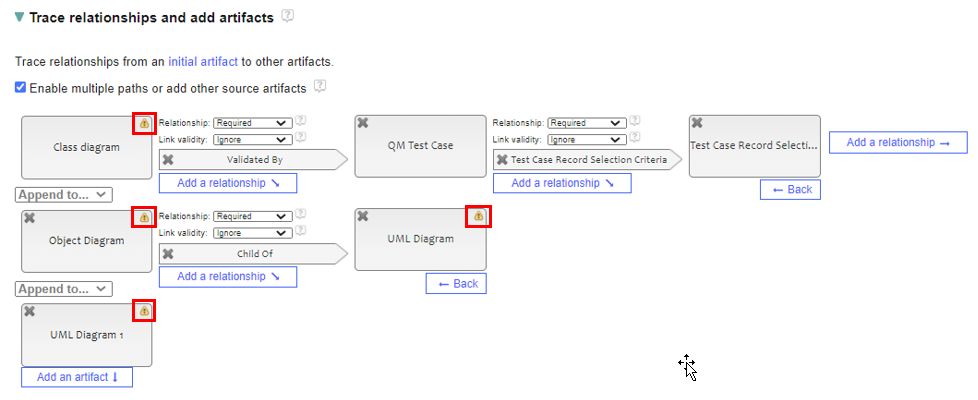
  • Report Builder supports ELM artifact name changes – Earlier, JRS v7.0.0 introduced feature to validate reports before generation when JRS report is not working due to either renamed or missing artifacts. This was so that individuals working on evolving their specific ELM artifacts types and information model could identify impact of change to the JRS reports and to notify report owners to re-create impacted reports. This was far from an ideal situation, since sometimes significant time was invested in creating JRS reports. When using JRS v7.0.2, users will see a warning icon with supporting hover text when a report has missing or renamed artifacts. They can click this warning icon to replace a missing artifact, and users can successfully save the report after all missing artifacts are replaced.

Image of the Trace relationships and add artifacts section with warning icons over artifacts:

Imran Hashmi IBM ELM engineering lifecycle management
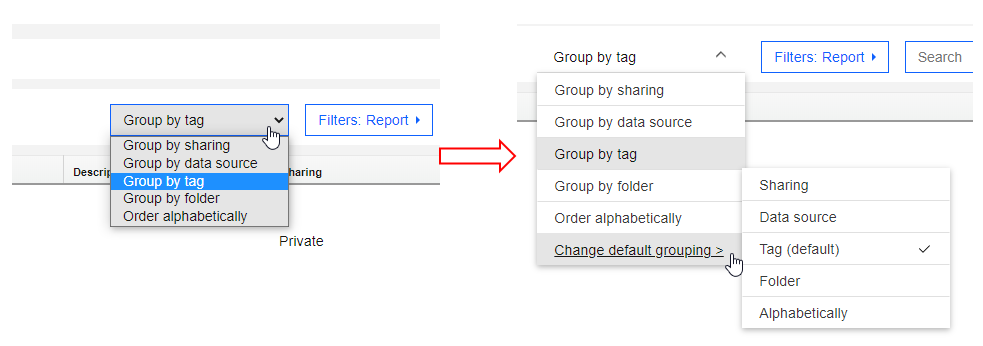
  • Change default grouping for reports, schedules, and results – Over the past few releases JRS introduced support for organizing JRS artifacts, reports and schedules, using folders. JRS still has option to view these assets using tags. As users are moving to the folder mode, there is a need to easily switch their reporting assets view. JRS v7.0.2 allows users to change the default grouping on the My reports, All reports, My schedules, All schedules, My results, and All results pages. The Group by list is enhanced to appear as a menu and an additional Change default grouping option is available for this purpose. If you do not change the default grouping, by default the records are grouped by tag.

Image of the Group by menu (before and after):

Imran Hashmi IBM ELM engineering lifecycle management

Engineering Lifecycle Optimization – Publishing (PUB) v7.0.2 (previously Rational Publishing Engine)

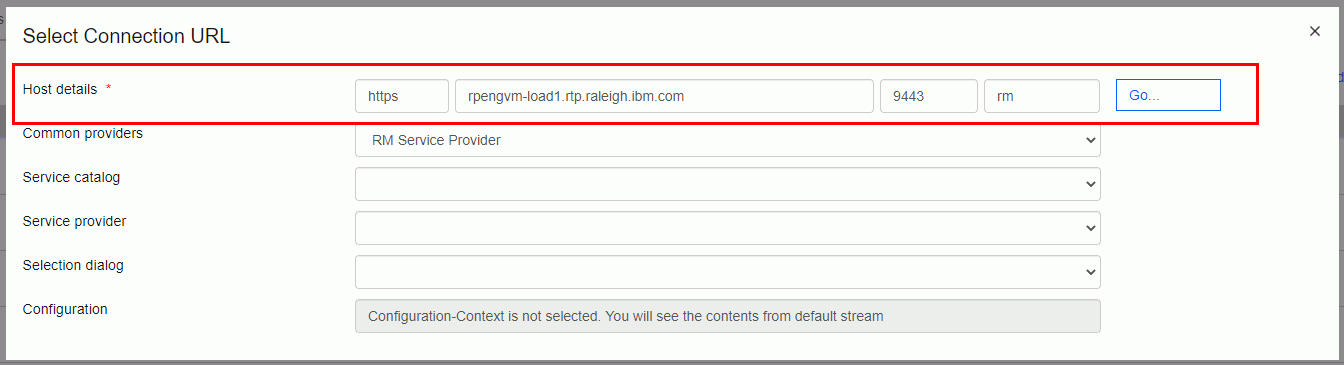
  • Enhancement to Resource and Configuration pickers – Publishing Document Builder (PUB DB) connection creation process is smarter now. If your PUB DB deployment is registered with a Jazz Team server (JTS), the JTS Server name is pre-populated in the host details field of Resource and Configuration pickers when you you add or edit a connection.

Image of resource picker in Document Builder:

Imran Hashmi IBM ELM engineering lifecycle management
  • Skipping invalid data during document generation – We have seen cases in which someone is generating a document with hundreds of pages, and somewhere in the middle data provider application returns invalid XML or JSON data. At this point, document generation stopped. PUB v7.0.2 allows users to set ignore the invalid data and continue to generate the document. A new property named Ignore Invalid Data Errors is added to the metadata of PUB Launcher and PUB DB. When this property is set to true, PUB skips the invalid data and still generates the document. Additional details on this topic can be learned watching Document Generation Resilience video.

Image of Ignore Invalid Data Errors from PUB Launcher and PUB Document Builder:

Imran Hashmi IBM ELM engineering lifecycle management

Engineering Lifecycle Optimization – Engineering Insights (ENI) v7.0.2 (previously IBM Rational Engineering Lifecycle Manager)

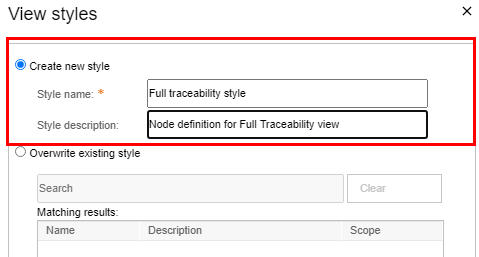
  • Enhanced view building experience – How much time have you spent creating your ideal ENI views? If there is one thing that view authors tell us they would like to have that would save them time, it’s to preserve the node definitions as a style and use that style across their views. We delivered this in ENI v7.0.2.

Image of View style window:

Imran Hashmi IBM ELM engineering lifecycle management
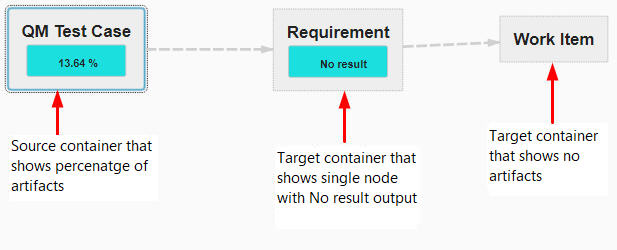
  • ENI view consumers can view the percentage of artifacts – ENI already provides a way to view artifacts count in a view, but often users want to see percentage as well or instead of a count. View consumers can now view the percentage of artifacts that meet a defined conditions, and ENI displays the percentage in the container.

Image of target container that shows percentage of artifact and no result output:

Imran Hashmi IBM ELM engineering lifecycle management

You can find out about other ELM reporting improvements in the new & noteworthy posts: JRS 7.0.2PUB 7.0.2 and ENI 7.0.2.

Let us know what you think about our latest release and share this blog post with your peers.

Fariz Saracevic
IBM Engineering Reporting (JRS, PUB, ENI) Offering Management